Open Strathlon on your watch once and allow Health access — after that it starts itself.
Needs an Apple Watch
WherePlan›Set up your Apple Watch
What it is
A card on the Plan tab reminds you to Set up your Apple Watch until you've done it: open the Strathlon app on your watch once and tap Allow when it asks for Health access. After that, sessions start on your watch automatically.
Why it helps
It's a one-time step that unlocks live heart rate and automatic recording for every session after it.
How to use it
On the Plan tab, find the Set up your Apple Watch card.
Open the Strathlon app on your watch once.
Tap Allow when your watch asks for Health access.
Tap Got it to dismiss the card — after this, you can leave the watch app closed.
Good to know
The card only shows if Strathlon detects a paired Apple Watch with the Strathlon app.
Starting a session on your phone starts your watch automatically — no taps needed.
Needs an Apple Watch
WhereAutomatic, when you start a session on your phone
What it is
Start a warm-up, workout or HIIT session on your phone and Strathlon launches the Strathlon watch app and starts recording for you, even if the watch app was closed. Your live heart rate starts streaming to your phone straight away.
Why it helps
You never have to start anything separately on your wrist.
When it happens
automatically, the moment you start a session on your phone
Watch idle screen
When nothing's running, your watch tells you to start on your phone.
Needs an Apple Watch
WhereWatch app›idle
What it is
With no session live, your watch shows the Strathlon logo and Start your workout on your phone, with Your watch mirrors it and streams your heart rate. underneath.
Why it helps
It tells you at a glance that sessions are started from your phone, not the watch.
When it happens
automatically, whenever nothing is running on your watch
Don't double-count reminder
A one-off spoken reminder and toast not to also start Apple's own Workout app.
Needs an Apple Watch
Wheresession start›toast
What it is
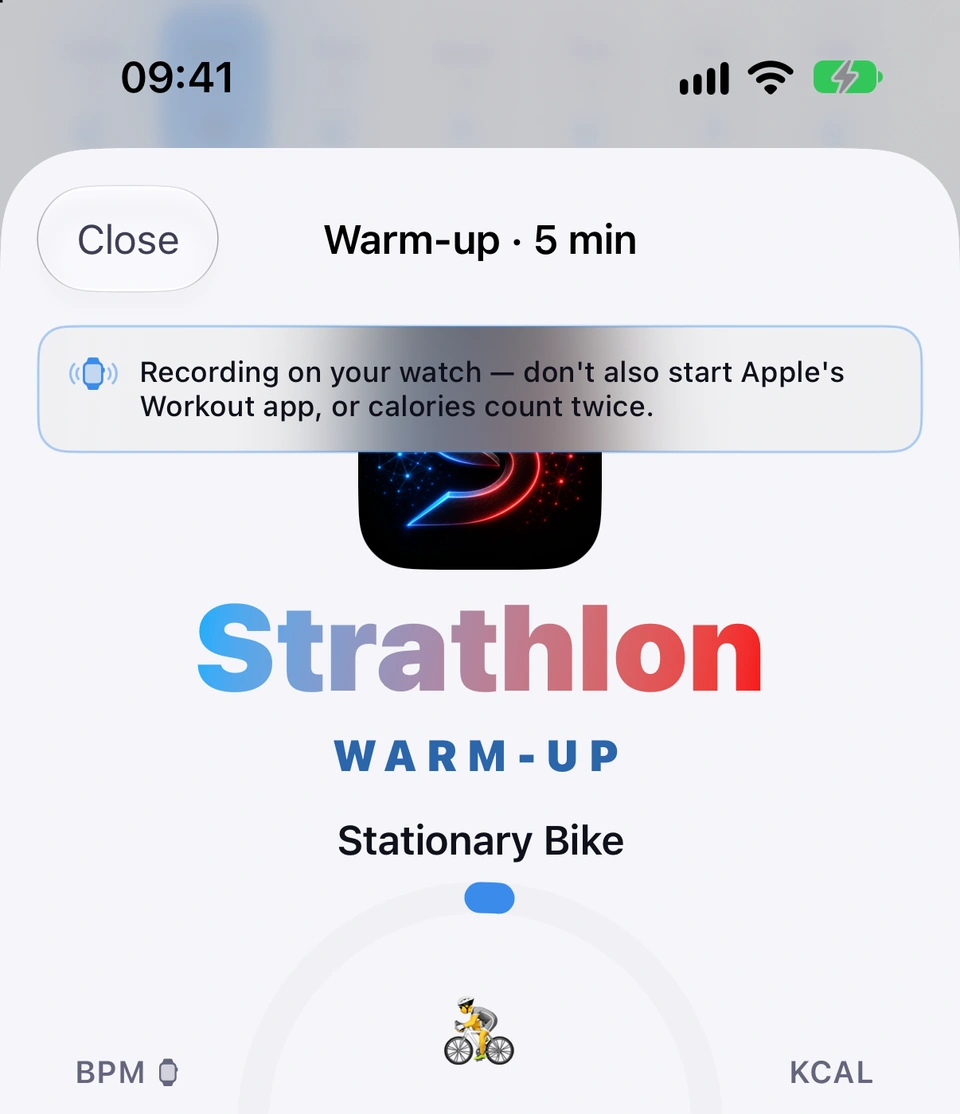
The moment your watch starts recording a session, Strathlon speaks and shows a toast — Recording on your watch — don't also start Apple's Workout app, or calories count twice. — once per session.
Why it helps
Running Apple's Workout app at the same time would record and count the same session twice.
The double-count reminder toast.
When it happens
automatically, once per session, the moment your watch starts recording
Good to know
It only fires when your watch is genuinely recording — if it can't save to Health, no reminder is given.
Your heart rate and calories burnt on your watch during a session, colour-coded and paired with your target.
Needs an Apple Watch
WhereWatch app›live session
What it is
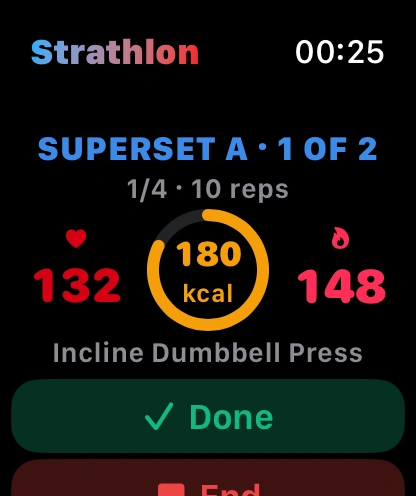
During a live session your watch shows your heart rate (amber below your target, red at or above it), the calories you've burnt, and your calorie target.
Why it helps
You can see how hard you're working and how close you are to your target without checking your phone.
Live heart rate on the wrist.
When it happens
automatically, on your watch, whenever a session is running
Tips
No watch? You still get a live heart rate from Apple Health where recent data is available.
With the subscription, control your whole session — sets, rest, HIIT — from your watch.
Needs an Apple Watch
With the subscription
WhereWatch app›live session controls
What it is
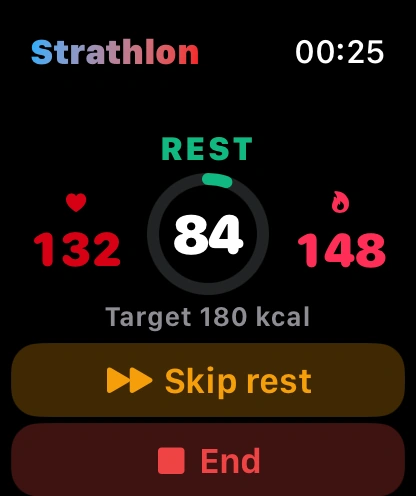
Subscribers can log a set, skip or change rest, pause and continue straight from the watch: Done logs a set and starts rest, tapping again during rest skips it, carrying you from warm-up through the HIIT finisher. Every tap shows a brief spinner until your phone has received and run it. Non-subscribers see the same live display — heart rate, calories, countdown — with Control from your phone in place of the buttons.
Why it helps
You can run a whole session without touching your phone.
How to use it
Hands-free controls on the wrist.During a live session, tap Done on your watch to log a set and start rest.
Tap again during rest to skip it.
Use Pause/Resume and Change rest as needed.
End, Finish and HIIT's Stop always respond, but ask End workout? first to confirm.
Good to know
Every advance button waits for your phone to confirm before it's tappable again, so a tap that hasn't landed can't be mistaken for one that has.
Choose your rest length or which HIIT exercise to start, right from your wrist.
Needs an Apple Watch
WhereWatch app›NEXT UP›Start / Choose HIIT
What it is
Tapping Start under NEXT UP on your watch opens Rest between sets — a rest picker with four lengths — right there on your wrist. At the hand-off into a HIIT finisher, Choose HIIT opens the same list of HIIT exercises your phone offers.
Why it helps
You don't need your phone in hand to choose how long to rest or which HIIT move to do next.
How to use it
On your watch, under NEXT UP, tap Start.
Pick a rest length: 45, 60, 90 or 120 seconds.
At a HIIT hand-off, tap Choose HIIT and pick from the list your phone sent over.
End, Finish and Stop always work on your watch, but ask you to confirm first.
Needs an Apple Watch
WhereWatch app›End›confirm
What it is
End, Finish and HIIT's Stop on your watch always respond, even while another tap is pending, but ask End workout? before they stop your session and end the watch recording.
Why it helps
You can always get out of a session from your wrist, with one confirmation so you don't end it by mistake.
How to use it
On your watch, tap End, Finish or Stop.
Tap End workout to confirm — this stops the session and ends the watch recording.
Your watch saves every session to Apple Health with calories, alongside the daily food totals your iPhone saves there.
Needs an Apple Watch
Uses Apple Health
WhereAutomatic›Watch app›Can't save to Health
What it is
Your watch saves each recorded session to Apple Health, with its calories. Your iPhone also saves the food you log in Strathlon there, as daily totals (Food saved to Apple Health): those two are everything Strathlon writes to Health. If the Workouts permission is off, your watch explains and shows how to fix it.
Why it helps
So your training shows up in Apple Health, and in any other app or feature that reads from it, without you doing anything extra.
When it happens
automatically, the moment your watch ends a recording block
How to use it
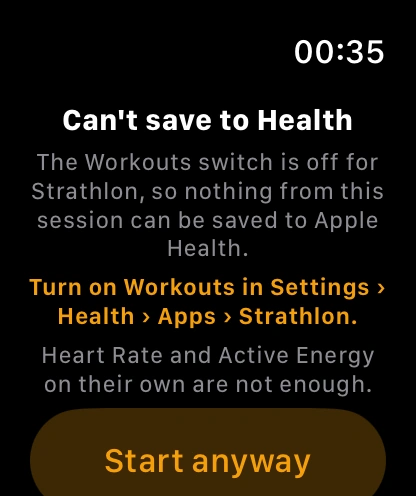
Can't save to Health.If saving is blocked, your watch shows Can't save to Health with the reason and a fix.
Tap the fix line to follow it, or Start anyway to train without saving, or Not now to back out.
Good to know
Heart Rate and Active Energy permissions on their own aren't enough — Workouts specifically has to be on.
Raise your wrist to save
A phone card reminds you to raise your wrist so your watch can finish saving a workout.
Needs an Apple Watch
Uses Apple Health
WherePhone›session screen card
What it is
If your watch needs a moment to save a session to Apple Health, a card on your phone reads Raise your wrist to let your watch save this workout to Apple Health.
Why it helps
Your watch needs to be awake and in front of you to answer Apple Health's save prompt, and this tells you exactly why to raise it.
When it happens
automatically, on your phone, while your watch is waiting to save a workout to Apple Health
Good to know
Only shown while your watch is paired, has the Strathlon app, and saving hasn't already been refused — a refusal shows the Can't save to Health screen instead.
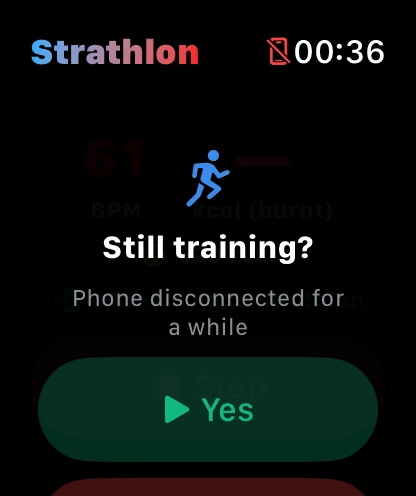
If your phone has been out of touch for a long while, your watch asks whether you're still training.
Needs an Apple Watch
WhereWatch app›Still training?›Yes / No
What it is
If your watch has had no contact with your phone for a long while mid-session, it asks Still training? with Yes and No. No, or no answer in time, ends and saves the session; Yes keeps it going.
Why it helps
Your watch needs to know whether to keep recording or wrap up a session your phone's lost touch with.
When it happens
automatically, after a long spell with no contact from your phone during a live session
How to use it
Still training?Tap Yes to keep recording.
Tap No to end and save the session now.
Good to know
If you don't answer in time, the session ends and is saved — it's never left running indefinitely.
Your watch tells you when it's reconnecting, when your phone's unavailable, and how old what it's showing is.
Needs an Apple Watch
WhereWatch app›status lines
What it is
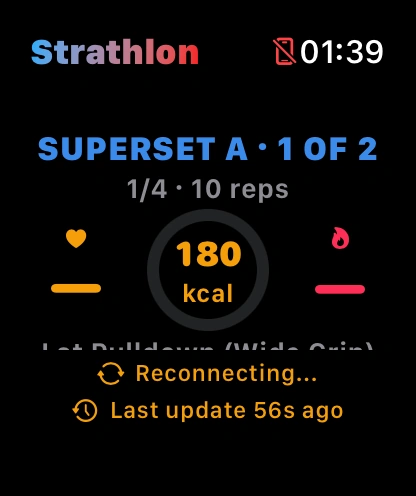
Your watch shows Reconnecting... while it's trying to reach your phone, Phone unavailable — still recording once it's lost touch (it keeps recording throughout), and a separate note if what's on screen is going stale.
Why it helps
So you're never looking at a frozen screen without knowing it — your watch says when what it's showing might be out of date.
Reconnecting to your phone, then Phone unavailable — still recording.
When it happens
automatically, whenever your phone and watch reconnect or fall out of touch during a session
With Low Power Mode on, your watch warns that buttons may lag and heart rate reads less often, plus how to turn it off.
Needs an Apple Watch
WhereWatch app›live session hint
What it is
While Low Power Mode is on during a live session, your watch shows Low Power Mode on — buttons may not respond and heart rate is read less often., with both a quick way to turn it off and how to stop it turning on automatically.
Why it helps
Low Power Mode quietly breaks the link to your phone, so buttons can go dead mid-set — this tells you why, and how to fix it.
When it happens
automatically, whenever Low Power Mode is on during a live session
How to use it
Watch for the warning under your live stats.
Turn it off now: side button › battery % › Low Power Mode.
Stop it turning on every workout: Settings › Workout.